
The AI Does the Bookkeeping. It Never Does the Maths.
Keel is an accounting system we build for small Australian businesses. An AI reads the bills, answers questions and suggests corrections, but every GST figure, exchange rate and total comes from plain, tested code. Here's how it's built, what it caught, and the GST trap our accountant warned us about.
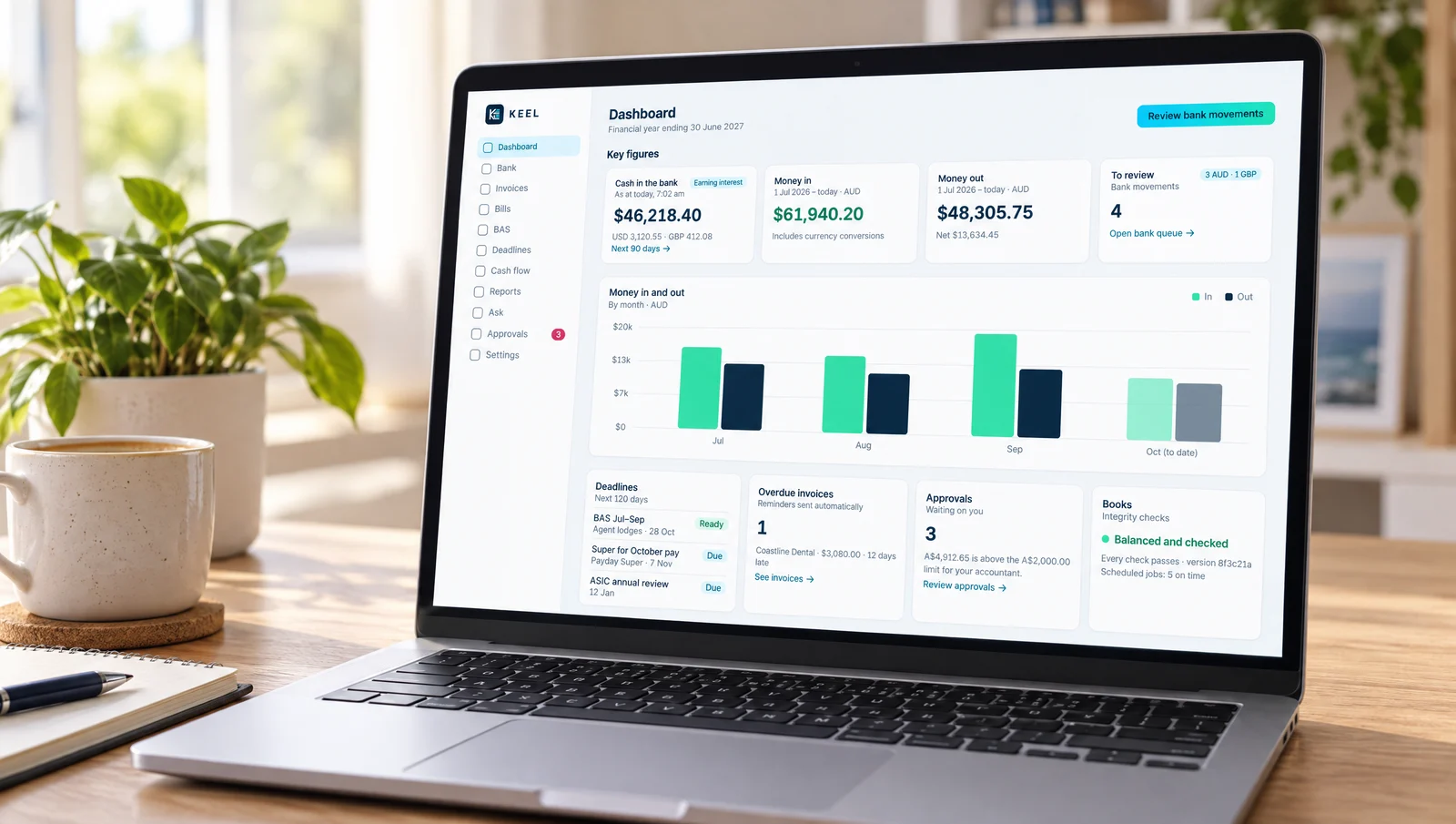
Ask a small-business owner how they feel about AI near their money and you’ll usually get the same answer: not yet, thanks. That’s a sensible instinct. A language model that writes a cheerful email can also invent a number with complete confidence, and in the books a confidently wrong number is worse than no number at all.
We’ve built an accounting system called Keel, and the first business running on it is a small Australian services company. AI is all through it. It also takes that instinct seriously. The whole design comes down to one rule:
The AI does the bookkeeping. It never does the maths.
Why build one at all
The company is small: a director, one employee, an outside accountant who lodges the BAS. It’s GST-registered, reports quarterly, and banks with an online multi-currency account, because a good share of its clients are overseas and pay in US dollars.
That last part is what made the off-the-shelf options awkward. Multi-currency is usually a top-tier feature, and the company was paying more than $100 a month mostly for that one feature. The cheaper packages that handle foreign currency well each had a gap somewhere else. So the question became: what would it take to build exactly what this business needs, and nothing it doesn’t?
The answer turned out to be less exotic than it sounds. Underneath Keel is Beancount, a mature open-source accounting engine that keeps the books as plain text. That means every entry can be read, compared and checked, and none of it is hidden inside a database. Around it sit a bank feed, the GST and BAS rules, invoicing, reports, and a web app the owner and the accountant both log into.
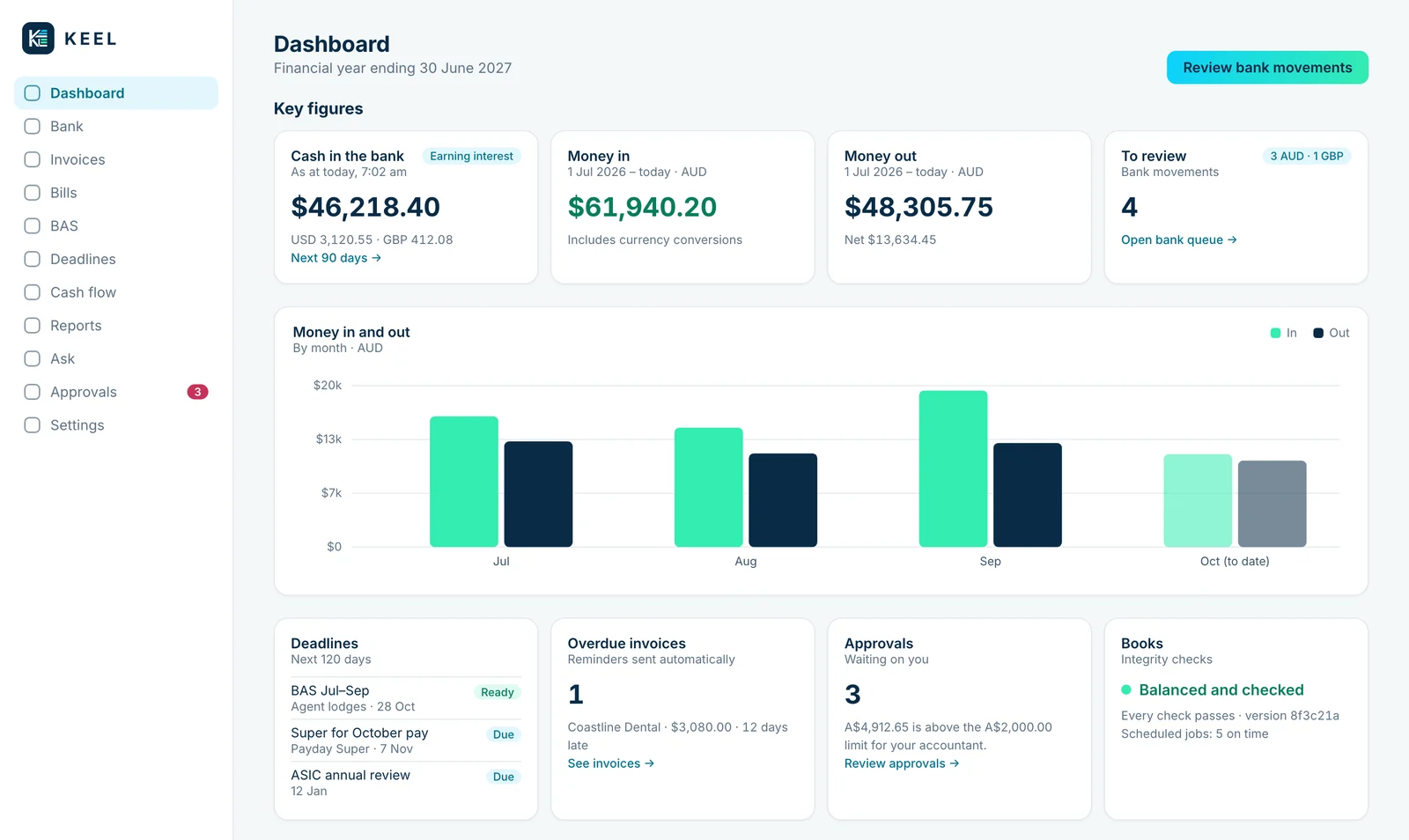
The Keel dashboard: where the money is, what’s due, and whether the books still check out. (Sample figures.)
The rule everything hangs on
Every bank movement arrives on its own. Keel suggests how to code it from standing rules (the phone bill is always the phone bill) and from how the same payee was coded last time. When it has no good reason for a suggestion, it leaves the line blank. A blank is better than a guess. A person confirms each one.
The AI does the parts that need reading and judgement:
- It reads the bills. Supplier invoices arrive by email as PDFs and photos. The AI reads each one and fills in the supplier, date, amount and ABN, and that’s all it can do. It has no other tools, and any text inside a document is treated as content, never as an instruction. Everything it returns is checked: the ABN is validated, the amounts are re-read as exact figures, and the GST split is recalculated by Keel, not taken from the AI.
- It answers questions. “What did we spend on software last quarter?” “Why is the BAS refund smaller than last time?” It can look at the books but can’t change them.
- It suggests corrections. If it spots something coded wrongly, it files a suggestion on the approvals list for a person to accept or reject.
What the AI never does is calculate. GST, foreign-exchange conversions, totals and BAS labels are all worked out by ordinary code with tests behind it. Money is held as exact decimals, never the rounding-prone kind of number most software uses by default. Dates are Melbourne dates, so an overseas payment made late at night lands in the right quarter.
Then, before anything is saved, every change goes through the same gate:
- Does it balance? Debits equal credits, every time.
- Does it have a GST code? Every income and expense line needs one, and the GST it produces is worked out by the code, not typed in.
- If it’s in a foreign currency, where did the rate come from? Each foreign line carries its Australian-dollar value and the source of the rate.
- Is the period still open? More on that below.
- Do the balances still tie? The bank balance in the books must match the bank, and the GST account must match the GST worked out from the entries.
If any check fails, the change is rolled back in full and Keel says exactly why. Nothing gets half-saved. This is what “AI near your money” should mean: the AI can be wrong as often as it likes, because it never gets the last word.
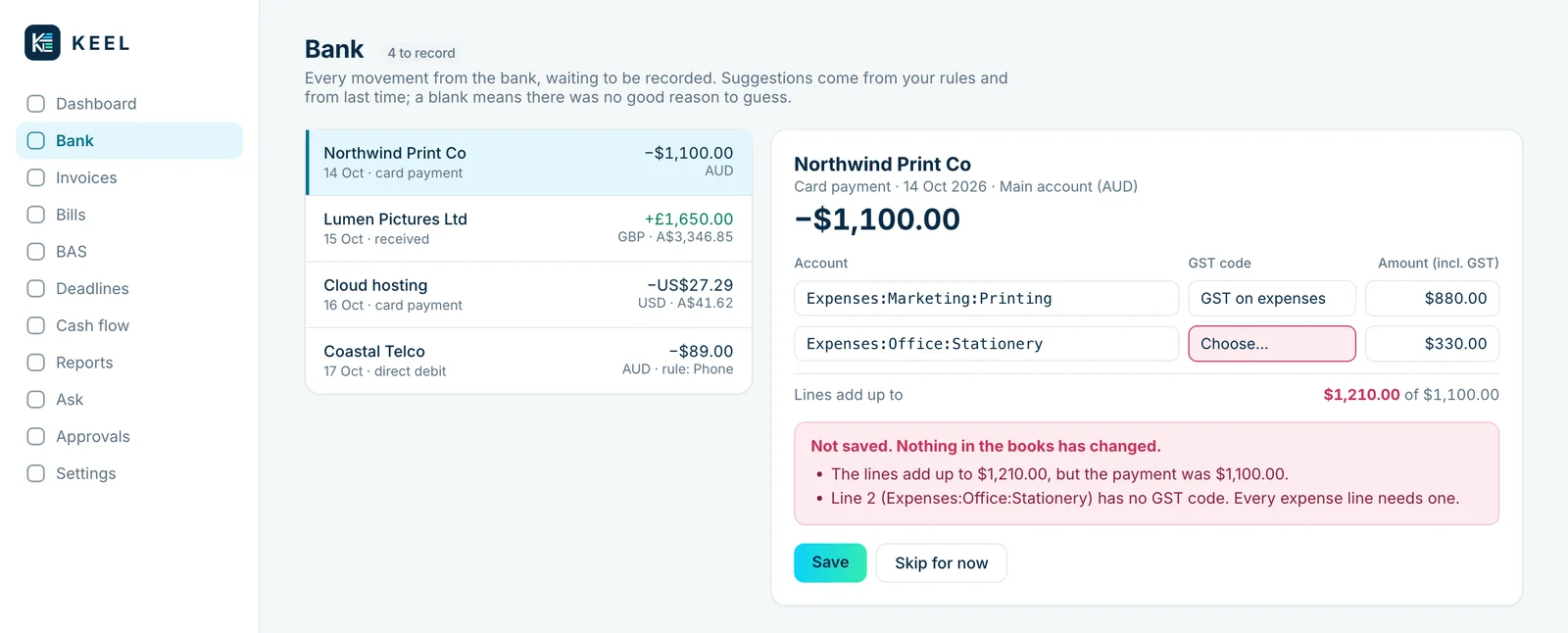
A change that fails a check isn’t saved, and the screen says exactly why. (Sample figures.)
Or just tell your own AI what to do
Keel also has a direct connection for AI agents, using MCP, the open standard most AI assistants now speak. That means the assistant you already use, whether it’s Claude, a bot in Telegram or something else, can work with the books directly.
In practice it’s very hands-off. When new movements come in from the bank, you tell your assistant to reconcile them, and it does. It records the ones it’s sure of and leaves the ones it isn’t for you to sort out on the Bank screen. You can ask it how the quarter is looking, have it track down why a balance looks wrong, or tell it to record a payment, all in plain English. The owner of the first business runs the books mostly this way: say what needs doing, and the agent gets on with it.
The agent gets its own login with its own limits. Everything it records goes through the same checks as anyone else’s, and anything large or sensitive lands on the approvals list. Even when it records an entry, it doesn’t work out the GST: it says what the payment was for, and Keel does the arithmetic. The rule still holds.
History is never rewritten
Most accounting software lets you quietly edit last month’s entry. Keel doesn’t. If something was coded wrongly, it’s fixed with a correcting entry: the original is reversed and the right version recorded beside it. The record keeps both, along with who made the change and why.
Bigger or more sensitive changes don’t go straight in. Anything over $2,000, anything touching the director’s loan, dividends or tax accounts, and any correction to an entry more than 90 days old goes to an approvals list for the owner to accept or refuse.
Once a quarter’s BAS is lodged, that quarter is sealed. Keel takes a fingerprint of every file in it, so any later change, however small, is flagged straight away. If a mistake turns up afterwards, the correction is dated today and carries a plain-English note about what it does to the next BAS, for example: “this movement had a GST credit of 36 cents; now it has none, so next quarter’s BAS comes out 36 cents worse.” Nobody has to work that out later.
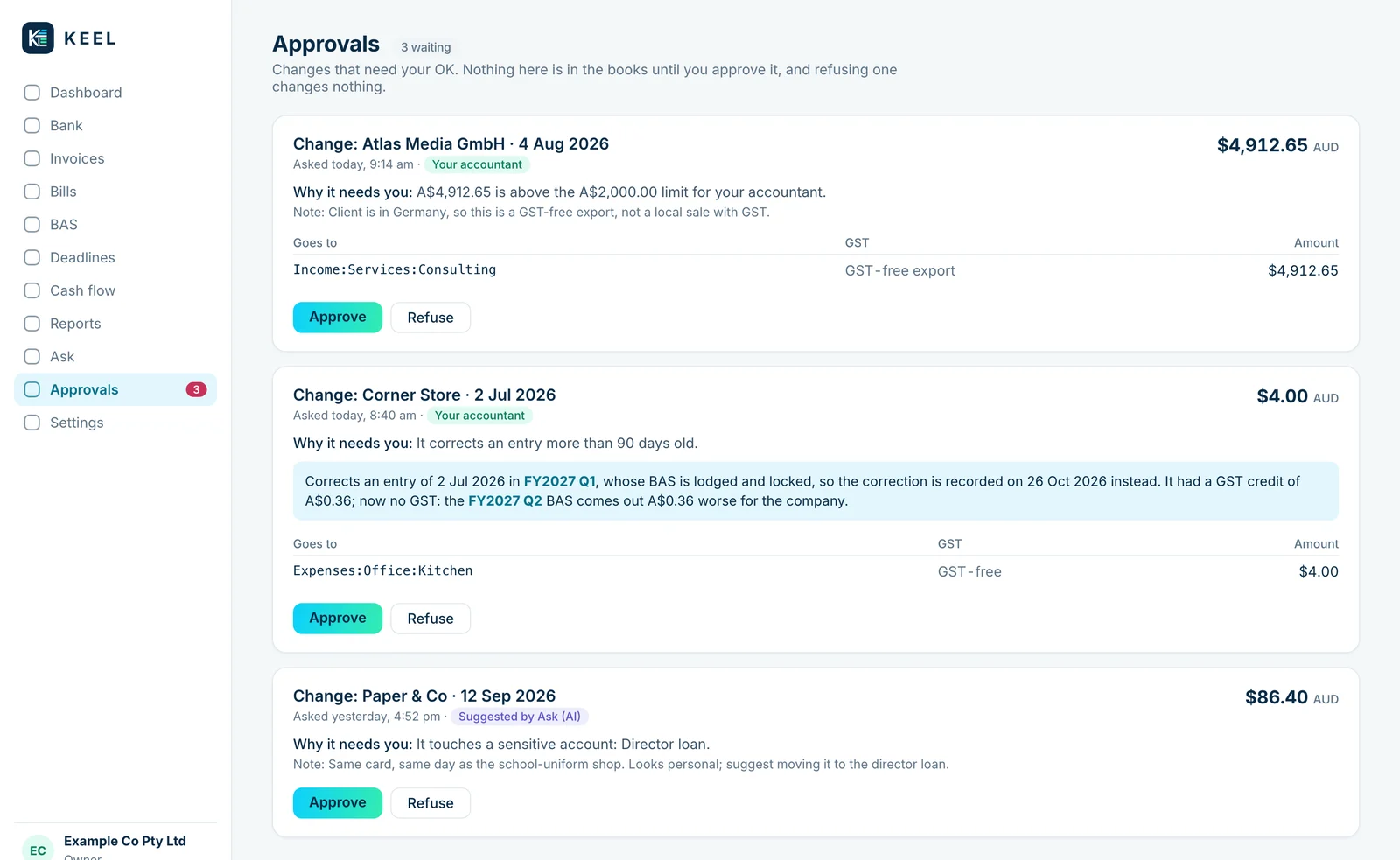
What waits for the owner, and why. The AI’s suggestions queue up here like anyone else’s. (Sample figures.)
Running both side by side
There was no big switchover day. For the first quarter Keel ran alongside the company’s old accounting software, and the BAS was compared line by line. Every difference had to have a written reason next to it before we trusted the result.
That’s where the value of doing it properly showed up. Two examples:
Wages counted twice. One pay run had been dated the last day of the old financial year in the old system, so the opening balances already treated it as paid. The bank feed then brought in the same payment a day later. Tying the wages owing to the old system’s month-end figures found the duplicate, and it was fixed with a correcting entry.
A correction that vanished. While building the quarter-sealing feature, we found that a correction made in a later quarter than the original entry was being left off every BAS. The rule that hides a mistake and its reversal when both fall in the same quarter was matching it on its own. It never touched a lodged figure, but it’s exactly the sort of bug that would sit unnoticed in a spreadsheet for years.
Neither of those is clever. They’re what comes of checking everything against something independent, which is the habit we built in from the start.
The accountant stays in charge
The accountant has their own login. They can read everything, download reports and the BAS workpaper, and record or correct entries themselves. The same approval rules apply to them as to the AI: large or sensitive changes wait for the owner. Approving changes, sealing a quarter, issuing invoices and changing settings stay with the owner.
That matters more than any feature. A small business doesn’t need software that replaces its accountant. It needs books the accountant can trust and open whenever they like.
The GST trap worth knowing about
While reviewing the first quarter, we asked the accountant a few questions. One answer is worth passing on to anyone running a small Australian business, whatever software they use.
Overseas software subscriptions. Plenty of the tools a modern business pays for (hosting, AI services, design apps) bill in US dollars from overseas companies. Their receipts sometimes show an amount labelled GST, and accounting software will often happily claim it back.
The accountant’s view was blunt: don’t claim GST unless you hold a valid tax invoice. Many overseas suppliers aren’t registered for GST in the normal way, and some never have to be. Seeing “GST” on a receipt isn’t the same as being entitled to the credit. If you’re GST-registered, it’s often better to give the supplier your ABN so they don’t charge it at all.
The other side is the money coming in. Sales to overseas clients are usually GST-free exports, and they belong in G1 on the BAS as GST-free sales, not left off it entirely. In the company’s old system they’d been coded as outside the BAS altogether. The overseas sales don’t change the GST you pay, only what your BAS reports; an over-claimed credit does change it, and that’s the one to watch.
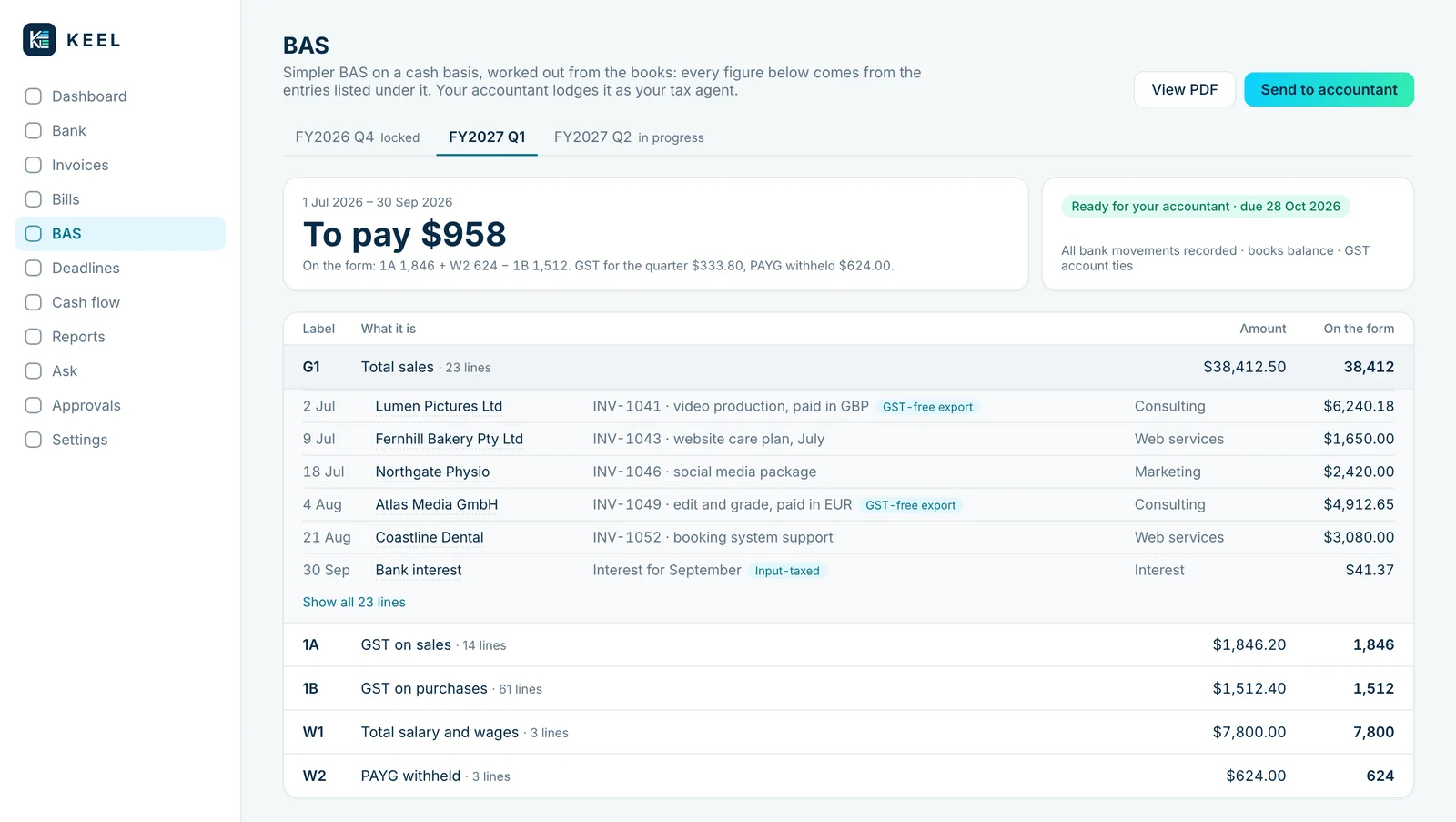
Keel’s BAS screen, label by label. Overseas sales sit in G1 marked as GST-free exports, and every figure opens to the entries behind it. (Sample figures.)
As with anything tax, check with your own accountant. Ours was quick to say it depends on the supplier.
Who Keel is for
Keel isn’t an off-the-shelf product you can sign up for. We build and set it up for each business that wants it, around how that business actually works: its bank, its currencies, its accountant, the way it invoices. The books are yours, kept as plain files you can read, check and take with you.
To be straight about it: for plenty of small businesses a mainstream accounting package is still the right answer. It’s supported, your accountant already knows it, and it does nothing surprising. Keel makes most sense when you’re paying a lot for one feature you need, when your business has a shape the packages handle badly, or when you want books you own rather than rent. Either way you still need an accountant. What changes is what they’re handed.
Depending on the feedback we get, Keel may become something you can simply sign up for one day. If you’d like it for your business, or have thoughts on what it should do, book a chat. We’d like to hear from you.
The part we’d carry into any AI project is the rule at the top. Let the AI do the reading, sorting and suggesting it’s genuinely good at. Keep anything that has to be right in plain, tested code, and make a person approve what matters. That’s not a limit on what AI can do for a small business. It’s what makes it safe to let it do anything at all.
Something in your business look like this? We build the software, websites, automation and AI that fix it — and the writing that goes with them.
Book a chat →